

Club management 01 Payments & documents 02 Inventory & store 03 Official website 04 AI Coach Assistant
Sports development 05 Online playbook 06 Practices 07 Games & stats 08 Scouting
More Player profile Cloob Community Free downloads Team consulting About us Leagues & tournaments · BOOWL Español
Try for free Log in to the platform
Play Designer · Online football playbook

Your playbook, from the whiteboard to the field: draw, install, practice and measure

CLOOB's online playbook is not a notebook of drawings. It is your living game system: you organize what gets taught each week, put it into practice, know who is studying it and take it with you to the field.

  • Play editor
  • Weekly installs
  • Study mode
  • Field mode and projector
  • Game sheets

Mockup of the CLOOB playbook: the week's install with its coverage and who has studied it, a play drawn in the editor and, on the phone, the play list with diagrams and tags.

A system, not a folder of drawings

Everything that happens to a play, in one place

You draw a play once. From there, that same play shows up in the week's install, in the practice block, in your players' quiz, on the game-day wristband and in the notes about what went wrong on Sunday.

Draw

Editor with route tree, formations and personnel. Variations that hang off their base play.

Install

Group plays into installs with dates. CLOOB tells you what is up this week and what still has not been run.

Practice

Drop the install into the session from the planner. Each block counts as a practiced session.

Measure

Study minutes, quizzes, scores and coverage, player by player and week by week.
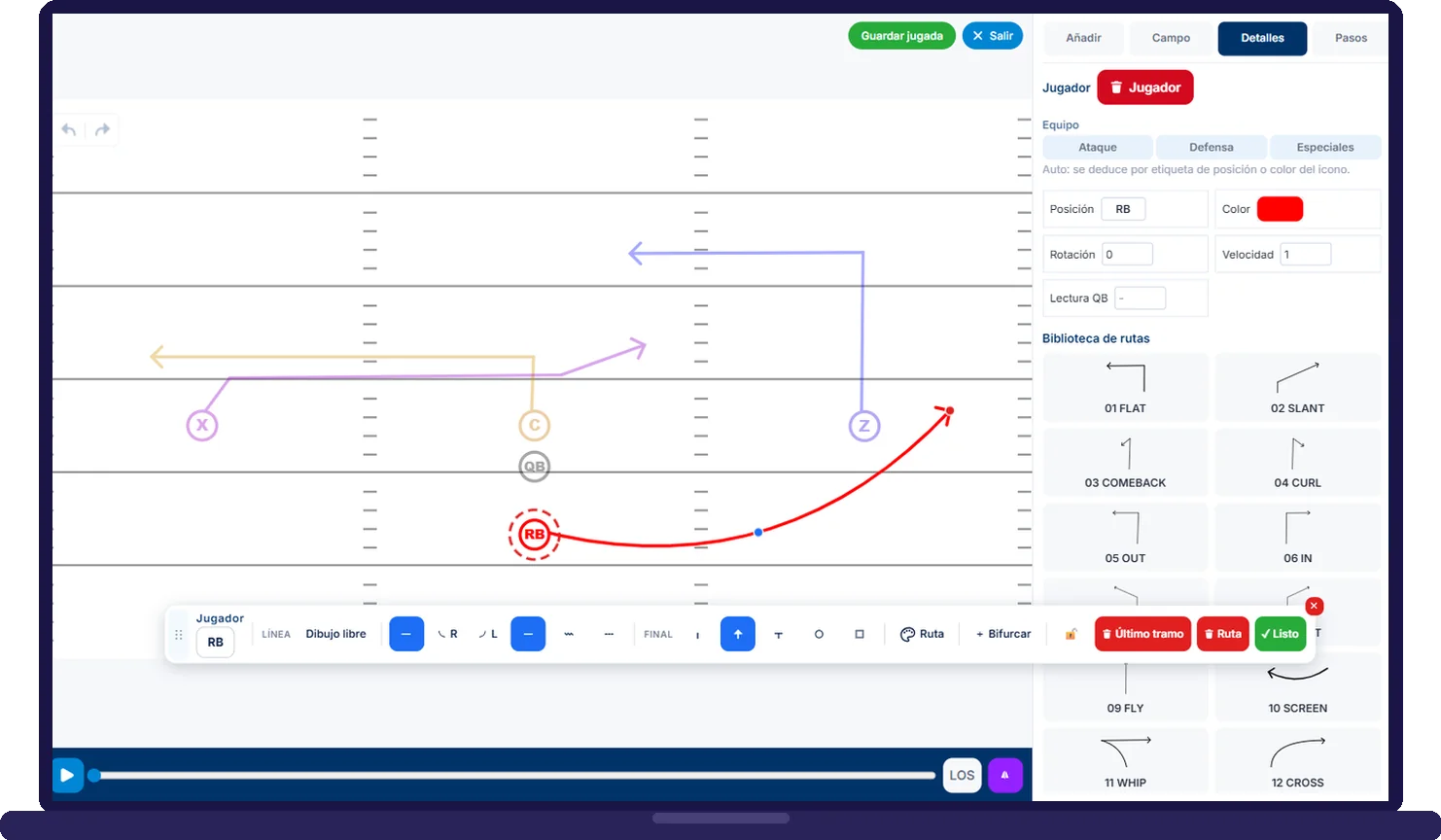
CLOOB play editor with the routes drawn, the drawing toolbar and the route library
Play editor

Draw like on the whiteboard, with the logic of the sport

Your club's routes, formations and personnel, not generic icons

You pick the formation, place your players by position and trace the routes from your club's route tree. Each play carries its type, its play-calls and its personnel, and can have variations that are not counted separately in reports.

  • 5v5 and 7v7 flag, 11v11 tackle
  • Your club's route tree and formation library
  • Variations linked to the base play
  • Video and photos of the execution on each play's card
  • Clooby describes the play and prepares examples for study
Installs

What gets taught each week, with tracking

You know what is up, how many times it has been worked and what still has not been run

An install is the part of the playbook you install in a given period: a set of plays grouped into blocks and placed on the calendar. The list sorts itself by phase (in progress, upcoming, undated, past) and each card tells you when it was last practiced and what percentage is covered.
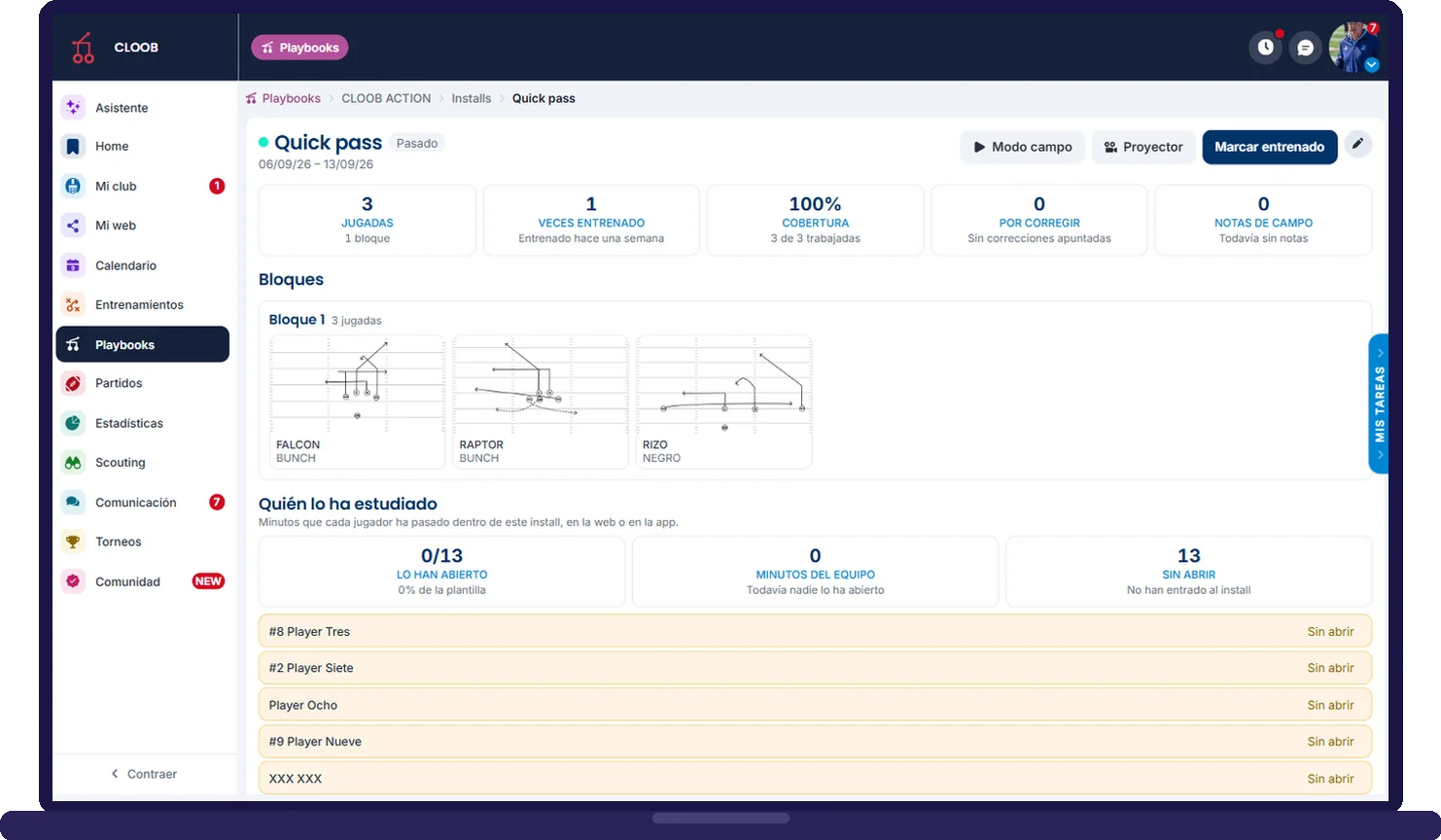
  • Play blocks with start and end dates
  • Times practiced, coverage and plays to correct
  • Alert for plays not reviewed in more than 21 days
  • Who has studied it: minutes per player and who has not opened it
This week's install in CLOOB: play blocks, times practiced, coverage and who has studied it
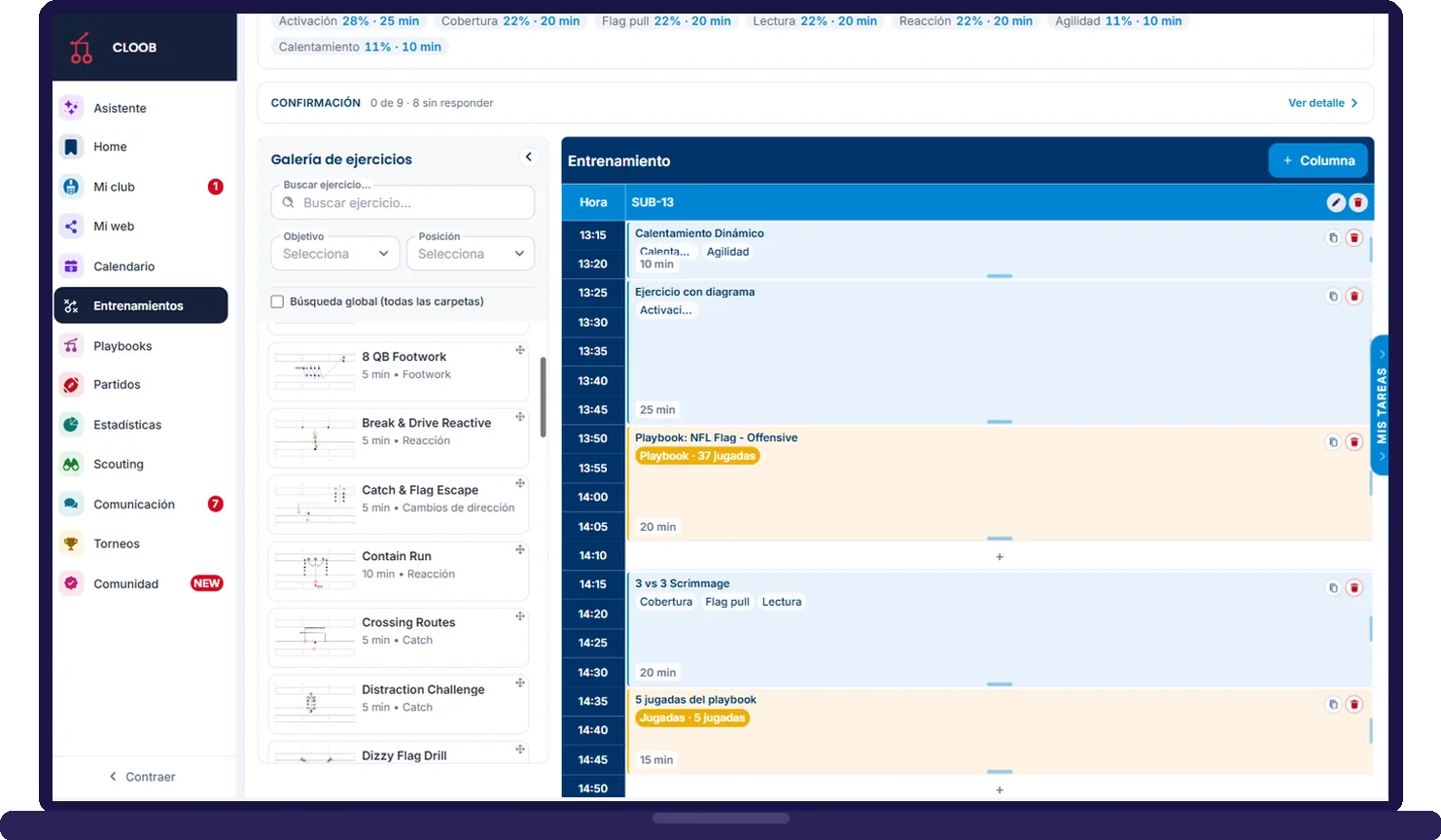
Practice planner in CLOOB with a playbook install block on the grid
Playbook in practice

From the install to the session, without copying anything

Every playbook block you plan counts as a session of the install

From the practice planner you add a playbook block: a full install, a few loose plays to review what went wrong on Sunday or the whole playbook before the game. The duration is suggested based on the plays and, when you save the session, the install is marked as practiced.

  • Install, loose plays or full playbook
  • If the install changes, the block changes with it
  • Players see the block's plays from their session
  • Report of what percentage of the playbook you have practiced
Study for players

You know who is actually learning it

Quizzes, flashcards and study minutes, player by player

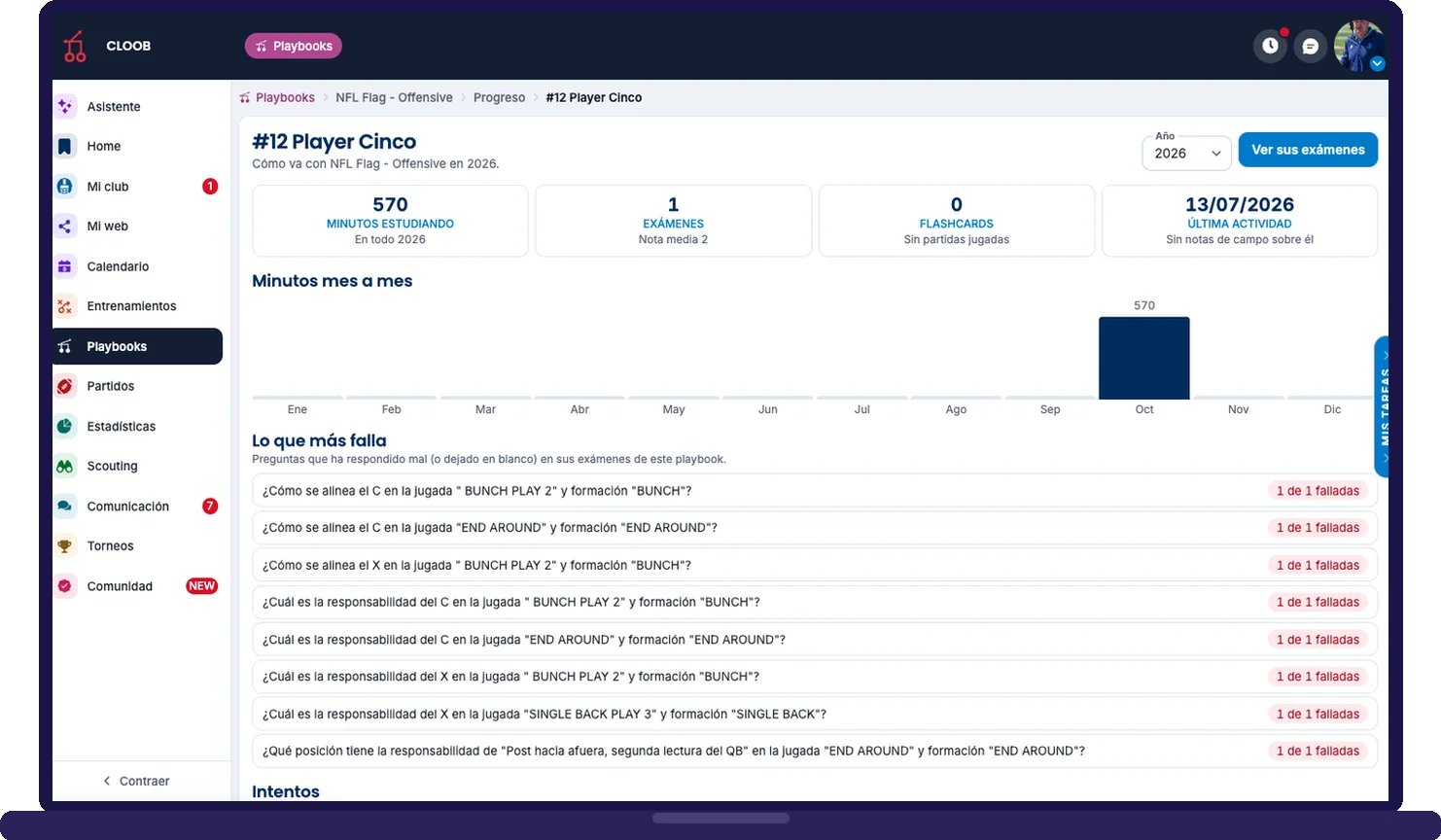
Your players study from the app: they see this week's install, take quizzes by position and concept and play flashcards with your real plays. You see participation, team minutes, the average score and, on each player's card, what they miss most.
  • Participation, team minutes and average per player
  • Automatic quizzes with score and last attempt
  • Player card: minutes month by month and missed questions
  • Separate counter for the week's install
A player's study progress in CLOOB: minutes studying, quizzes with average grade, flashcards, minutes month by month and the questions they miss most
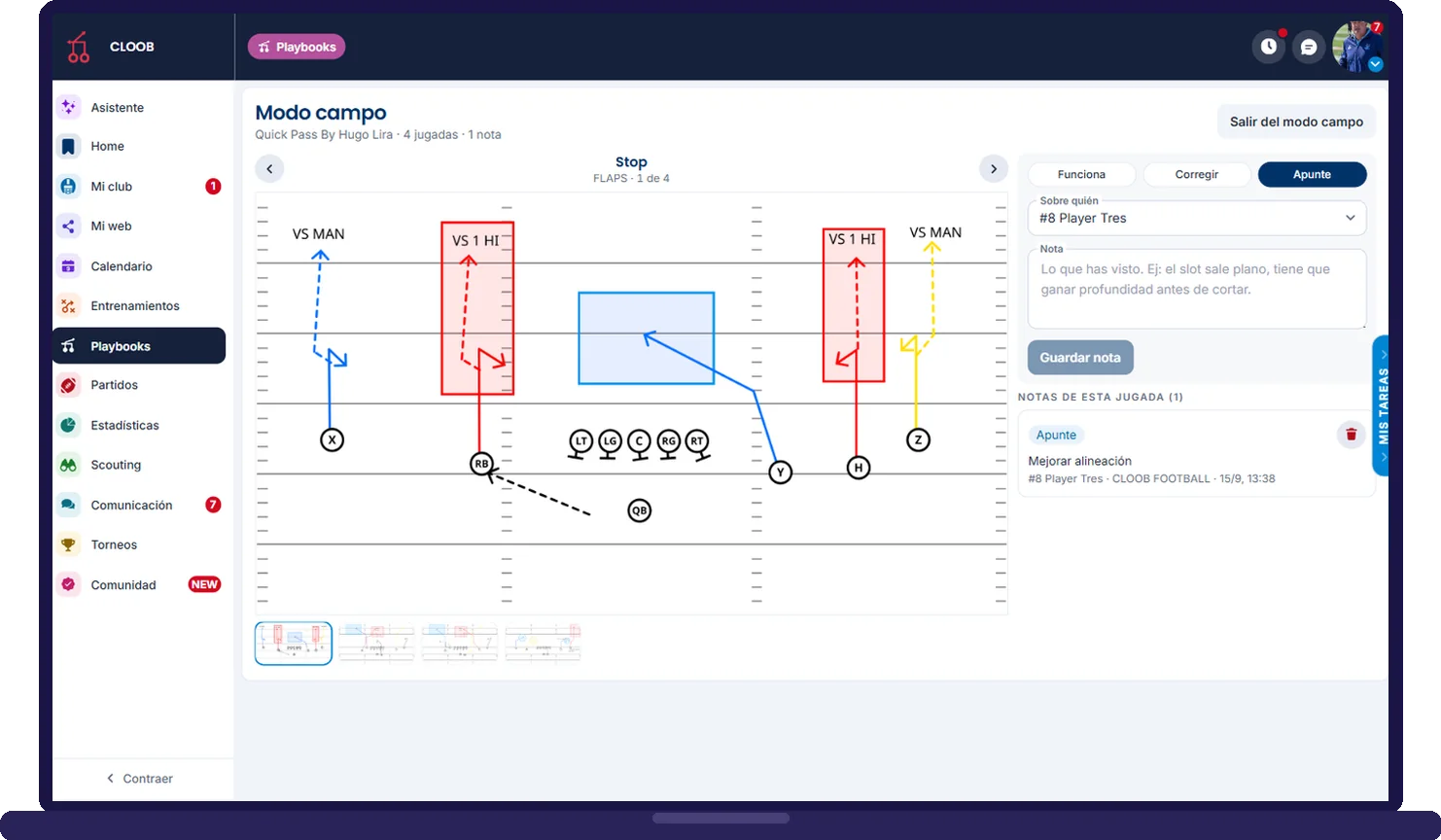
CLOOB field mode: the play on a large screen with the notebook Works, Fix and Note
Field mode and projector

Take it to the field, the locker room and the game

The coach's notebook, play by play

Field mode is the whiteboard on a large screen with a notebook beside it: you jot down what works, what needs fixing and notes about the team or a specific player, and it stays as the playbook's history. The projector is the same whiteboard in full screen for the locker room or the tablet on the sideline.

  • Works · Fix · Note, about the team or a player
  • Scoped to an install, a drive or a practice block
  • Game sheets and wristband by play-call (1st down, 3&5, VS Cover 2)
  • Personnel and drives: who goes in and in what order it gets called
  • Download the full playbook as a ZIP
Published or draft

You decide what the team sees and when

A draft playbook is only visible to the coaching staff. When you close out the week, you publish it with one gesture and it shows up in the app for players in that category. Same goes per play and per install: active, draft or archived.

  • Playbooks by category and type (offense, defense, special teams)
  • Publish with one click, back to draft from options
  • Plays and installs with their own status
  • Clooby connected to the playbook to describe and explain
7-day free trial

Start building your game system in under 2 minutes

  • Route tree and formation library included
  • Free online training session to use the editor
  • No credit card, no commitment
Activate my free trial
Frequently asked questions

About the online playbook

Can I draw flag football and American football plays?
Yes. The editor comes with fields and formations for 5v5 and 7v7 flag and 11v11 tackle, with your club's route tree and a formation library to get started in minutes.
What is an install?
It is the part of the playbook you teach in a given period: a handful of plays grouped into blocks and placed on the calendar. CLOOB tells you which install is up this week, how many times it has been practiced, what percentage is covered and which plays have gone more than 21 days without review.
Can my players study the playbook from their phone?
Yes. They see the published playbooks for their category, this week's install and study mode with quizzes and flashcards. Their coach sees the minutes they spend studying, player by player.
Can I print the wristband and the game sheet?
Yes. With play-calls (1st down, 3&5, VS Cover 2…) you build the game sheets and the wristband, ready to print on game day, and you can download the whole playbook as a ZIP.
Is there a free trial?
Yes. Activate the 7-day free trial in under 2 minutes; it includes the route tree, the formation library and a free online training session.
Start today

We have something in common: a passion for this sport

Try CLOOB free for 7 days, or book a call and we will walk you through the platform using your team as the example.

Try for free Book a call No credit card · Plans by module · Cancel anytime